


Most IT certification exams cost hundreds of dollars, and a retake doubles the expense along with the lost time. Careful preparation with Microsoft Pro: Windows 7, Enterprise Desktop Administrator on Real4Prep is how serious candidates avoid that second bill.
Microsoft 070-686 Exam Overview:
| Certification Vendor: | Microsoft |
|---|---|
| Exam Name: | Pro: Windows 7, Enterprise Desktop Administrator |
| Exam Number: | 70-686 |
| Exam Price: | USD 165 |
| Related Certifications: | MCSA: Windows 7 MCITP: Enterprise Desktop Administrator 7 |
| Passing Score: | 700 out of 1000 |
| Real Exam Qty: | 40-60 |
| Available Languages: | German, Japanese, Spanish, French, English |
| Certificate Validity Period: | Retired, no expiration after earned |
| Exam Duration: | 150 minutes |
| Exam Format: | Performance-Based, Multiple Answer, Scenario-Based, Multiple Choice |
| Recommended Training: | Microsoft Official Self-Paced Training Kit 6294A: Planning and Managing Windows 7 Desktop Deployments and Environments |
| Exam Registration: | Microsoft Learning (Retired) |
| Sample Questions: |  |
| Exam Way: | Retired exam; originally delivered via Pearson VUE test centers and online proctored format |
| Pre Condition: | Minimum 3 years of experience installing, configuring, and administering Windows clients and deployment tools; recommended prior knowledge of Windows Server and System Center suite |
| Official Syllabus URL: | https://social.technet.microsoft.com/wiki/contents/articles/7747.exam-70-686-pro-windows-7-enterprise-desktop-administrator.aspx |
Microsoft 070-686 Exam Syllabus Topics:
| Section | Weight | Objectives |
|---|---|---|
| Designing Client Configurations | 17% | - User state migration
|
| Designing a Windows 7 Client Deployment | 15% | - Compatibility assessment
|
| Planning and Managing a Client Life Cycle Strategy | 16% | - Software updates management
|
| Designing Application Packages for Deployment | 17% | - Application compatibility management
|
| Designing a Standard Image | 17% | - Security and settings standardization
|
| Identifying and Resolving Deployment and Client Configuration Issues | 19% | - Resolving Group Policy and configuration problems
|
070-686 Exam Questions Answered
If you are purchasing for a company, take all three versions of Microsoft Pro: Windows 7, Enterprise Desktop Administrator, since different employees study differently. If you are buying for yourself, pick the single version that matches your habits: the PDF for printing and writing on paper, the PC test engine for simulation tests with scored feedback, or the APP online engine for cross-platform use with offline support.
070-686 requires 700 out of 1000 to pass, and the official exam fee is USD 165. Remember that a retake means paying that fee again, which is why focused preparation matters.
The 070-686 exam contains 40-60 questions within 150 minutes minutes. Rehearsing under the same limit on the Real4Prep engine builds calm, automatic pacing.
IT certification exams are not cheap, and failing usually means paying the full fee a second time plus losing the hours you already invested. Serious preparation with Microsoft Pro: Windows 7, Enterprise Desktop Administrator exists precisely to prevent that double cost: study the 185 verified questions well, and you give yourself a strong, realistic chance of passing the 070-686 exam the first time.
Microsoft Learning (Retired): register for 070-686
The package includes 185 practice questions for the 070-686 exam, all with verified answers, in PDF, PC test engine, and APP online engine versions.
Minimum 3 years of experience installing, configuring, and administering Windows clients and deployment tools; recommended prior knowledge of Windows Server and System Center suite
- Designing Application Packages for Deployment (17%)
- Designing Client Configurations (17%)
- Designing a Standard Image (17%)
Spend your hours where the weights are highest.
6294A: Planning and Managing Windows 7 Desktop Deployments and Environments: Visit official page
Microsoft Official Self-Paced Training Kit: Visit official page
Microsoft Pro: Windows 7, Enterprise Desktop Administrator Sample Questions:
Your company has an Active Directory domain.
You are planning the deployment of Windows 7 to client computers that are located in a main office and in satellite offices. All client computers use the same hardware. Your company's security policy has the following requirements:
All client computers in the main office must run Windows 7 Enterprise.
All client computers in the satellite offices must use BitLocker.
All client computers in the main office must apply a custom security template.
The template must not apply to client computers in the satellite offices.
You need to recommend an image-creation strategy that meets the requirements of the security policy. The
solution must minimize administrative effort. What should you include in your recommendations?
- A. One image for all client computers and a Group Policy object.
- B. One image for the main office computers and one image for the satellite office computers. A Data Recovery Agent and a Security database (secedit.sdb)
- C. One image for the main office computers and one image for the satellite office computers. A Group Policy object
- D. One image for all client computers and a Data Recovery Agent. A Security database (secedit.sdb).
Correct Answer: A 🗳️
Topic 1, Company One
This question is one in a series of questions that all present the same scenario. For your convenience, the
scenario is repeated in each question. (Click the Case Study button.)
Each question presents a different goal and answer choices, but the text of the scenario is exactly the same
in each question in this series.
You are deploying Windows 7 Enterprise and Microsoft Office to client computers.
The deployment must meet the following requirements:
Deploy Windows 7 Enterprise to all client computers.
Deploy Office 2007 Professional to client computers in the Munich office.
Deploy Office 2010 Professional to client computers in the Madrid office.
Automate the deployment to minimize administrative effort.
You need to recommend a deployment solution that meets the requirements.
What should you recommend?
Company, Inc. (Case Study): Background
You are the desktop architect for a company with 14,000 client computers. Some client computers are portable computers and some are desktop computers. All client computers currently run Windows XP.
You are in the evaluation phase for upgrading to Windows 7. Approximately half of the Carlsbad and Madrid offices are used by sales employees. Sales employees report to the office only once per quarter. Your company has users in offices as shown in the following table.
The address for the SharePoint site is https://intranet.company.com.
Each location has gigabit network connections to the desktop except Madrid, which has 100 megabit connections. Each office has a Dynamic Host Configuration Protocol (DHCP) server and uses multiple VLANs.
You use Group Policy objects (GPOs) to manage various settings. The following figure displays the Organizational Unit (OU) layout for the Active Directory Domain Services (AD DS) domain.
Each office has two connections, a data center WAN link and an Internet connection. Each office connects to a central data center facility with connection speeds as shown in the following table.
You currently use one of each client computer model to create and maintain a disk image for each model. The models supported by your company are listed in the following table.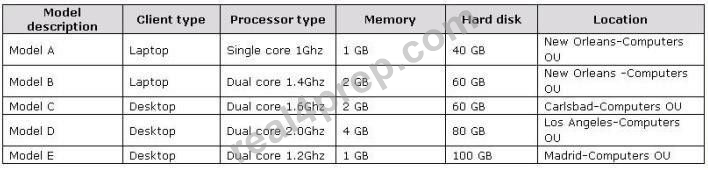
You currently use a third-party disk imaging application to capture and deploy new Windows XP computers.
Desktop administrators use optical media to deploy the image to new or repurposed client computers. The current Windows XP image is about 11 GB in size, which includes 2 GB of applications and 9 GB of Windows XP files.
Business Requirements
The deployment of Windows 7 must meet the following business requirements:
Deployment requirements
The deployment must maximize the use of existing client computers. The deployment must reduce the amount of time spent updating client computers after deployment.
Technical Requirements
The application must meet the following technical requirements:
Infrastructure requirements
The amount of disk space required to store deployment images must be reduced. The number of images that need to be copied across WAN links must be reduced. You are based in the Los Angeles office and use the Microsoft Deployment Toolkit. You have a file server hosting a deployment share in Los Angeles.
Application compatibility
All current applications must be supported on Windows 7.
All offices are moving to a new finance application in the next six months. The new finance application
installs and runs correctly on Windows 7.
Migration requirements
The deployment cannot require users to store their files on a network or external drive for the migration. Only system administrators can be allowed to install applications. User data must be migrated during upgrades to Windows 7. There is a small budget for hardware upgrades when required.
Image maintenance
You need to minimize the re-arm passes.
Security
Each location has a security group made up of the desktop computer objects in that location. Users must
not be able to change their web browser or client computer security settings.
Your requirements are as follows:
A startup PIN and TPM are required for all BitLocker users.
Local regulations prohibit the use of BitLocker for all computers in the Munich office. This supersedes any other requirement.
All laptops within the company must have BitLocker enabled.
All Madrid desktops must have BitLocker enabled.
No other desktops besides Madrid should have Bitlocker enabled.
Computers in office lobbies are not permitted to join the domain.
You need to block the use of ActiveX controls for all external websites.
- A. Create a single Windows 7 Enterprise Edition image. Deploy the image that installs Office by using a Group Policy object based on the user who is logged in.
- B. Create a single Windows 7 Enterprise Edition image. Deploy the image that installs Office by using a task sequence that checks for the account used for deployment.
- C. Create a Windows 7 Enterprise Edition image with Office 2007 installed. Create a second Windows 7 Enterprise Edition image with Office 2010 installed.
- D. Create a single Windows 7 Enterprise Edition image. Deploy the image that installs Office by using a task sequence that checks for the Organizational Unit of the client computer.
Correct Answer: D 🗳️
Explanation: Only visible for Real4Prep members. You can sign-up / login (it's free).
Your company's network has client computers that run Windows 7.
A software vendor releases version 2 of an application that your company uses.
Your company currently uses version 1. Version 1 and version 2 are not compatible.
You plan to deploy version 2 of the application.
You have the following requirements:
Users must be able to run both versions of the application on their computers.
Version 2 must be available when a client computer is not connected to the network.
You need to plan a software deployment process that meets the requirements.
What should you do? (Choose all that apply.)
- A. Deploy version 2 of the application by using Microsoft Enterprise Desktop (MED-V).
- B. Deploy version 2 of the application by using Microsoft Application Virtualization (App-V).
- C. Deploy version 2 of the application as a Remote Desktop Services RemoteApp.
- D. Deploy version 2 of the application by using a Microsoft System Center Configuration Manager package.
Correct Answer: A,B 🗳️
Explanation: Only visible for Real4Prep members. You can sign-up / login (it's free).
Your network is configured as shown in the exhibit. (Click the Exhibit button.)
You are planning to deploy Windows 7.
You have the following requirements:
Use BitLocker on all computers in the isolated network.
Provide DirectAccess on all portable computers.
Use the Key Management Service (KMS) to activate all client computers.
You need to plan a client computer licensing strategy that meets the requirements.
What should you do?
Exhibit: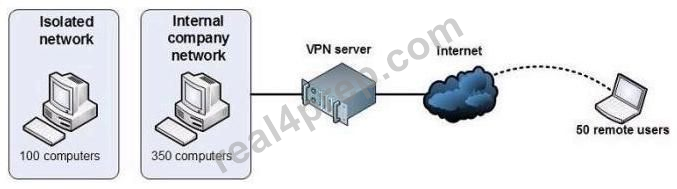
- A. License 500 copies of Windows 7 Ultimate.
- B. License 350 copies of Windows 7 Professional, license 150 copies of Windows 7 Ultimate, and purchase Software Assurance for the Windows 7 Professional licenses.
- C. License 350 copies of Windows 7 Enterprise, and license 150 copies of Windows 7 Ultimate.
- D. License 500 copies of Windows 7 Enterprise.
Correct Answer: D 🗳️
Your company is planning to deploy Windows 7.
You have an image that is used to deploy Windows 7 on client computers.
You need to add a volume image to the existing Windows image.
What should you do?
- A. Service the image online.
- B. Use DiskPart to attach a new volume.
- C. Use ImageX to append the volume image.
- D. Use the Deployment Image Servicing and Management (DISM) tool to mount the image.
Correct Answer: C 🗳️
Explanation: Only visible for Real4Prep members. You can sign-up / login (it's free).
Viewing page 1 out of 37 pages.
Viewing questions 1-5 out of 185 questions.


