


Choose materials the way professionals do: evidence first. Real4Prep offers a free download of genuine 070-697 Deutsch sample content so you can learn about the Microsoft Configuring Windows 10 Devices (070-697 Deutsch Version) product before committing in 2026.
Microsoft 070-697 Deutsch Exam Overview:
| Certification Vendor: | Microsoft |
|---|---|
| Exam Name: | Configuring Windows Devices |
| Exam Number: | 70-697 |
| Exam Price: | USD 165 |
| Related Certifications: | MCSA: Windows 10 |
| Available Languages: | Chinese (Traditional), English, Japanese, Chinese (Simplified), French, German, Portuguese (Brazil) |
| Passing Score: | 700/1000 |
| Exam Format: | Multiple Choice, Simulation, Multiple Response, Case Study, Drag and Drop, Hot Area, Build List |
| Real Exam Qty: | 40-60 |
| Exam Duration: | 120-150 |
| Certificate Validity Period: | Retired |
| Sample Questions: |  |
| Exam Way: | Computer-based exam delivered through Pearson VUE testing centers and online proctored testing (when available). |
| Pre Condition: | No formal prerequisite exam. Candidates typically first passed Exam 70-698 (Installing and Configuring Windows 10) to earn the MCSA: Windows 10 certification. |
| Official Syllabus URL: | https://learn.microsoft.com/en-us/credentials/certifications/exams/70-697/ |
Microsoft 070-697 Deutsch Exam Syllabus Topics:
| Section | Weight | Objectives |
|---|---|---|
| Topic 1: Manage Data Access and Protection | 15-20% | - Manage access
|
| Topic 2: Manage Identity | 15-20% | - Manage authentication
|
| Topic 3: Manage Connectivity | 10-15% | - Configure remote access
|
| Topic 4: Manage Device Management | 35-40% | - Implement mobile device management
|
| Topic 5: Manage Windows Store and Cloud Services | 10-15% | - Manage cloud services
|
Before You Book the 070-697 Deutsch Exam: Read These
Currently, the 070-697 Deutsch exam's passing score is 700/1000 and the registration fee is USD 165. Both are Microsoft's figures and subject to revision — verify them on the official site before you schedule.
Reliability here is built, not claimed. The 070-697 Deutsch bank is written by a team of IT experts and certified trainers with a wealth of knowledge in the Microsoft Configuring Windows 10 Devices (070-697 Deutsch Version) field, and we constantly keep it updated. The online test engine is the signature service: it fits the atmosphere of the actual test in advance, supports Windows, Mac, Android, and iOS, carries no installation limits, and lets you practice anytime, anywhere — perfectly suited to IT workers. Download the free sample first to learn about the product, and know that after purchase you may request the latest version at any time on top of 365 days of automatic updates.
The Microsoft Configuring Windows 10 Devices (070-697 Deutsch Version) blueprint covers these core domains:
- Manage Connectivity (10-15%)
- Manage Windows Store and Cloud Services (10-15%)
- Manage Data Access and Protection (15-20%)
Further domains complete the official outline; the bank addresses every one.
Upon successful payment, our system automatically sends the product to your mailbox — typically within about a minute — with an instant download link on screen. If nothing arrives within two hours, check your spam folder and contact our 24/7 online support. Updates are free for 365 days: whenever a new version is released, we send the updated bank to your mailbox automatically — and you can also request the latest version from us at any time. A 50% renewal discount applies when the period ends.
Microsoft states the following prerequisites for the Microsoft Configuring Windows 10 Devices (070-697 Deutsch Version): No formal prerequisite exam. Candidates typically first passed Exam 70-698 (Installing and Configuring Windows 10) to earn the MCSA: Windows 10 certification..
Confirm the details on the official certification page before registering.
According to the latest exam information, the 070-697 Deutsch exam includes 40-60 questions and allows 120-150 minutes. The online engine reproduces those conditions so practice matches the formal test's atmosphere.
Clear and dependable. If you fail the corresponding exam within 60 days of purchase, send the score report to our support team together with a scanned copy of your enrollment slip — the official Score Report PDF must reach us within two days of the exam date — and verified claims receive a full refund within seven days. Exclusions: exams taken within three days of purchase, candidate names that differ from the payer, and free or expired products. If you have another test in mind, you may instead wait for the next update or exchange your product for two others of equal value at no cost.
Microsoft Configuring Windows 10 Devices (070-697 Deutsch Version) Sample Questions:
Sie konfigurieren den automatischen VPN-Trigger für fünf Windows 10 Enterprise-Computer. Wenn Sie die Computer testen, lösen sie das VPN die ganze Zeit aus, auch im Büro.
Sie müssen den automatischen VPN-Trigger so konfigurieren, dass er nur funktioniert, wenn VPN erforderlich ist.
Welchen Befehl solltest du verwenden?
- A. -VpnConnectionTriggerTrusted Network hinzufügen [-Name] <string> [-DnsSuffix] <string []>
- B. Add -VpnConnectionTriggerApplication [-Name] <string> -ApplicationID <String []> -PassThru
- C. Add -VpnConnectionTriggerDnsConfiguration [-Name] <string> -DnsSuffix <String> [- DnsIPAddress <string []>] -PassThru
- D. Set -VpnConnectionTriggerDnsConfiguration [-Name] <string> [-DnsSuffix <String>] [- DnsIPAddress <string []>] [-DnsSuffixSearchList
Correct Answer: A 🗳️
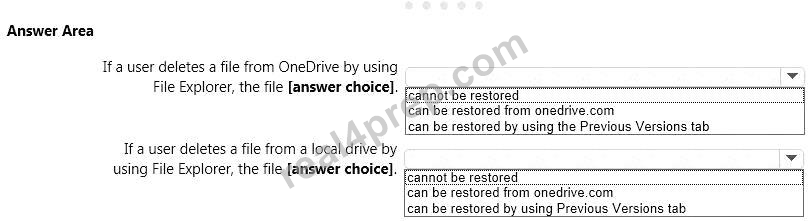
Sie haben einen eigenständigen Computer, auf dem Windows 10 Enterprise ausgeführt wird. Der Computer ist so konfiguriert, dass Dateien mithilfe des Dateiverlaufs automatisch gesichert werden. Der Benutzer des Computers verwendet die OneDrive-Desktop-App, um Dateien zu synchronisieren.
Die Einstellungen für Vorgängerversionen aus der lokalen Gruppenrichtlinie des Computers werden in der folgenden Grafik angezeigt.
Verwenden Sie die Dropdown-Menüs, um die Antwortauswahl auszuwählen, die die einzelnen Anweisungen anhand der in der Grafik angezeigten Informationen vervollständigt.
HINWEIS: Jede richtige Auswahl ist einen Punkt wert.
Correct Answer:

Erläuterung
Wenn eine Datei mit dem Datei-Explorer aus dem lokalen OneDrive-Ordner gelöscht wird, wird die Löschung auf Onedrive.com repliziert und die Datei in den OneDrive-Papierkorb verschoben. Die gelöschte Datei kann daher aus dem Papierkorb von Onedrive.com wiederhergestellt werden.
Wenn ein Benutzer eine Datei mit dem Datei-Explorer von einem lokalen Laufwerk löscht, kann die Datei nicht wiederhergestellt werden. Wenn sich die Datei nicht im OneDrive-Ordner befindet, wird sie nicht mit onedrive.com synchronisiert. Wir können frühere Versionen verwenden, um die Datei wiederherzustellen. Dies wird jedoch durch die Gruppenrichtlinieneinstellungen verhindert. Die Einstellung "Wiederherstellung lokaler Vorgängerversionen verhindern" - Aktivierte Gruppenrichtlinien verhindern, dass die Vorgängerversion wiederhergestellt wird.
Verweise:
http://www.groovypost.com/howto/restore-deleted-files-local-onedrive-folder/
Sie unterstützen Windows 10 Enterprise-Computer. AppLocker-Richtlinien werden bereitgestellt.
Die Unternehmensrichtlinie besagt, dass AppLocker deaktiviert sein muss.
Sie müssen AppLocker deaktivieren.
Welche drei Aktionen sollten Sie nacheinander ausführen? (Um zu antworten, verschieben Sie die entsprechenden Aktionen aus der Liste der Aktionen in den Antwortbereich und ordnen Sie sie in der richtigen Reihenfolge an.)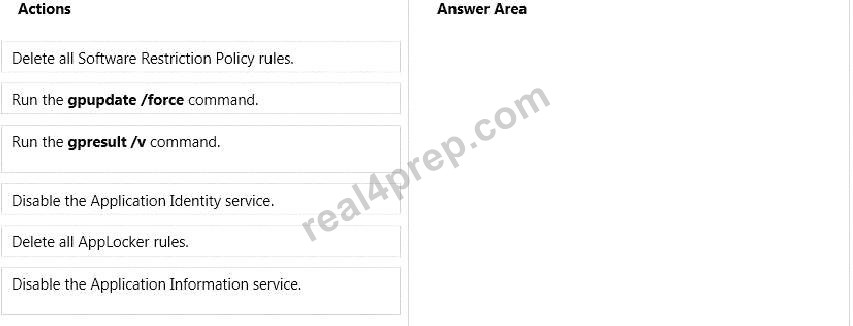
Correct Answer:
Erläuterung
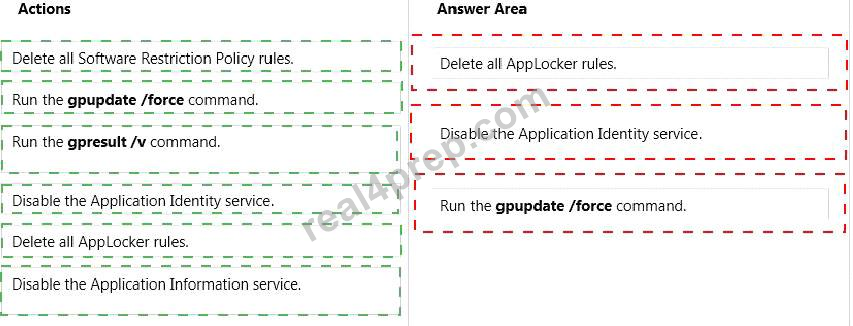
Box 1: Löschen Sie alle AppLocker-Regeln.
Box 2: Deaktivieren Sie den Application Identity-Dienst.
Box 3: Führen Sie den Befehl gpupdate / force aus.
Hinweis:
* Bevor Sie AppLocker-Richtlinien erzwingen können, müssen Sie den Anwendungsidentitätsdienst mithilfe der Dienste-Snap-In-Konsole starten.
* Der Application Identity Service ermittelt und überprüft die Identität einer Anwendung. Durch das Beenden dieses Dienstes wird die Durchsetzung von AppLocker-Richtlinien verhindert.
Mit dem Befehl gpresult werden die Richtlinienergebnissatz-Informationen (Resultant Set of Policy, RSoP) für einen Remotebenutzer und einen Remotecomputer angezeigt. In Verbindung mit dem Parameter / v werden ausführliche Richtlinieninformationen angezeigt. Dies schließt detaillierte Einstellungen ein, die mit einer Priorität von 1 angewendet wurden.
Verweise:
http://technet.microsoft.com/en-us/library/hh852337.aspx
http://technet.microsoft.com/en-us/library/cc733160.aspx
Ein Unternehmen verfügt über eine AD DS-Domäne (Active Directory Domain Services). Auf allen Clientcomputern wird Windows 10 Enterprise ausgeführt. Einige Computer verfügen über einen TPM-Chip (Trusted Platform Module).
Sie müssen ein einzelnes Gruppenrichtlinienobjekt (Group Policy Object, GPO) konfigurieren, das die Windows BitLocker-Laufwerkverschlüsselung auf allen Clientcomputern ermöglicht.
Welche beiden Aktionen sollten Sie ausführen? Jede richtige Antwort ist Teil der Lösung.
- A. Aktivieren Sie die Richtlinieneinstellung Laufwerkverschlüsselung auf Betriebssystemlaufwerken erzwingen.
- B. Aktivieren Sie die Option, um BitLocker ohne kompatibles TPM zuzulassen.
- C. Konfigurieren Sie das TPM-Validierungsprofil, um die Platform Configuration Register-Indizes (PCRs) 0, 2, 4 und 11 zu aktivieren.
- D. Aktivieren Sie die Richtlinieneinstellung Zusätzliche Authentifizierung beim Start erforderlich.
Correct Answer: B,D 🗳️
Explanation: Only visible for Real4Prep members. You can sign-up / login (it's free).
Ein Unternehmen verfügt über Windows 10 Enterprise-Clientcomputer.
Wenn ein Benutzer versucht, von seinem tragbaren Clientcomputer aus zu drucken, während er mit dem Unternehmensnetzwerk verbunden ist, stellt er fest, dass der Standarddrucker auf seinen Heimdrucker und nicht auf den Bürodrucker eingestellt ist.
Sie müssen sicherstellen, dass der Standarddrucker für den Computer der Bürodrucker ist, wenn der Computer mit dem Unternehmensnetzwerk verbunden ist, und der Heimdrucker des Benutzers, wenn der Computer mit seinem Heimnetzwerk verbunden ist.
Was sollten Sie auf dem tragbaren Computer tun?
- A. Konfigurieren Sie in den Druckereigenschaften des Unternehmensdruckers den aktiven Anschluss mit den richtigen TCP / IP-Einstellungen für den Drucker.
- B. Installieren Sie den Unternehmensdrucker und legen Sie ihn als Standarddrucker fest. Fügen Sie dann den Heimdrucker zu den Heimnetzgruppeneinstellungen hinzu.
- C. Stellen Sie eine Verbindung zum Heimnetzwerk her und wählen Sie im Kontextmenü des freigegebenen Druckerobjekts die Option Verbinden. Stellen Sie dann eine Verbindung zum Unternehmensnetzwerk her und wählen Sie im Kontextmenü des freigegebenen Druckerobjekts die Option Verbinden.
- D. Legen Sie für jedes Netzwerk einen Standarddrucker fest.
Correct Answer: D 🗳️
Viewing page 1 out of 68 pages.
Viewing questions 1-5 out of 340 questions.


