


2025 The Most Effective Professional-Machine-Learning-Engineer with 290 Questions Answers
Try Free and Start Using Realistic Verified Professional-Machine-Learning-Engineer Dumps Instantly.
NEW QUESTION # 14
You received a training-serving skew alert from a Vertex Al Model Monitoring job running in production.
You retrained the model with more recent training data, and deployed it back to the Vertex Al endpoint but you are still receiving the same alert. What should you do?
- A. Update the model monitoring job to use the more recent training data that was used to retrain the model.
- B. Temporarily disable the alert until the model can be retrained again on newer training data Retrain the model again after a sufficient amount of new production traffic has passed through the Vertex Al endpoint
- C. Update the model monitoring job to use a lower sampling rate.
- D. Temporarily disable the alert Enable the alert again after a sufficient amount of new production traffic has passed through the Vertex Al endpoint.
Answer: A
Explanation:
The best option for resolving the training-serving skew alert is to update the model monitoring job to use the more recent training data that was used to retrain the model. This option can help align the baseline distribution of the model monitoring job with the current distribution of the production data, and eliminate the false positive alerts. Model Monitoring is a service that can track and compare the results of multiple machine learning runs. Model Monitoring can monitor the model's prediction input data for feature skew and drift.
Training-serving skew occurs when the feature data distribution in production deviates from the feature data distribution used to train the model. If the original training data is available, you can enable skew detection to monitor your models for training-serving skew. Model Monitoring uses TensorFlow Data Validation (TFDV) to calculate the distributions and distance scores for each feature, and compares them with a baseline distribution. The baseline distribution is the statistical distribution of the feature's values in the training data. If the distance score for a feature exceeds an alerting threshold that you set, Model Monitoring sends you an email alert. However, if you retrain the model with more recent training data, and deploy it back to the Vertex AI endpoint, the baseline distribution of the model monitoring job may become outdated and inconsistent with the current distribution of the production data. This can cause the model monitoring job to generate false positive alerts, even if the model performance is not deteriorated. To avoid this problem, you need to update the model monitoring job to use the more recent training data that was used to retrain the model. This can help the model monitoring job to recalculate the baseline distribution and the distance scores, and compare them with the current distribution of the production data. This can also help the model monitoring job to detect any true positive alerts, such as a sudden change in the production data that causes the model performance to degrade1.
The other options are not as good as option B, for the following reasons:
* Option A: Updating the model monitoring job to use a lower sampling rate would not resolve the training-serving skew alert, and could reduce the accuracy and reliability of the model monitoring job.
The sampling rate is a parameter that determines the percentage of prediction requests that are logged and analyzed by the model monitoring job. Using a lower sampling rate can reduce the storage and computation costs of the model monitoring job, but also the quality and validity of the data. Using a lower sampling rate can introduce sampling bias and noise into the data, and make the model monitoring job miss some important features or patterns of the data. Moreover, using a lower sampling rate would not address the root cause of the training-serving skew alert, which is the mismatch between the baseline distribution and the current distribution of the production data2.
* Option C: Temporarily disabling the alert, and enabling the alert again after a sufficient amount of new production traffic has passed through the Vertex AI endpoint, would not resolve the training-serving skew alert, and could expose the model to potential risks and errors. Disabling the alert would stop the model monitoring job from sending email notifications when the distance score for a feature exceeds the alerting threshold, but it would not stop the model monitoring job from calculating and comparing the distributions and distance scores. Therefore, disabling the alert would not address the root cause of the training-serving skew alert, which is the mismatch between the baseline distribution and the current distribution of the production data. Moreover, disabling the alert would prevent the model monitoring job from detecting any true positive alerts, such as a sudden change in the production data that causes the model performance to degrade. This can expose the model to potential risks and errors, and affect the user satisfaction and trust1.
* Option D: Temporarily disabling the alert until the model can be retrained again on newer training data, and retraining the model again after a sufficient amount of new production traffic has passed through the Vertex AI endpoint, would not resolve the training-serving skew alert, and could cause unnecessary costs and efforts. Disabling the alert would stop the model monitoring job from sending email notifications when the distance score for a feature exceeds the alerting threshold, but it would not stop the model monitoring job from calculating and comparing the distributions and distance scores.
Therefore, disabling the alert would not address the root cause of the training-serving skew alert, which is the mismatch between the baseline distribution and the current distribution of the production data.
Moreover, disabling the alert would prevent the model monitoring job from detecting any true positive alerts, such as a sudden change in the production data that causes the model performance to degrade.
This can expose the model to potential risks and errors, and affect the user satisfaction and trust.
Retraining the model again on newer training data would create a new model version, but it would not
* update the model monitoring job to use the newer training data as the baseline distribution. Therefore, retraining the model again on newer training data would not resolve the training-serving skew alert, and could cause unnecessary costs and efforts1.
References:
* Preparing for Google Cloud Certification: Machine Learning Engineer, Course 3: Production ML Systems, Week 4: Evaluation
* Google Cloud Professional Machine Learning Engineer Exam Guide, Section 3: Scaling ML models in production, 3.3 Monitoring ML models in production
* Official Google Cloud Certified Professional Machine Learning Engineer Study Guide, Chapter 6:
Production ML Systems, Section 6.3: Monitoring ML Models
* Using Model Monitoring
* Understanding the score threshold slider
* Sampling rate
NEW QUESTION # 15
You have deployed multiple versions of an image classification model on Al Platform. You want to monitor the performance of the model versions overtime. How should you perform this comparison?
- A. Compare the loss performance for each model on a held-out dataset.
- B. Compare the mean average precision across the models using the Continuous Evaluation feature
- C. Compare the loss performance for each model on the validation data
- D. Compare the receiver operating characteristic (ROC) curve for each model using the What-lf Tool
Answer: B
Explanation:
The performance of an image classification model can be measured by various metrics, such as accuracy, precision, recall, F1-score, and mean average precision (mAP). These metrics can be calculated based on the confusion matrix, which compares the predicted labels and the true labels of the images1 One of the best ways to monitor the performance of multiple versions of an image classification model on AI Platform is to compare the mean average precision across the models using the Continuous Evaluation feature. Mean average precision is a metric that summarizes the precision and recall of a model across different confidence thresholds and classes. Mean average precision is especially useful for multi-class and multi-label image classification problems, where the model has to assign one or more labels to each image from a set of possible labels. Mean average precision can range from 0 to 1, where a higher value indicates a better performance2 Continuous Evaluation is a feature of AI Platform that allows you to automatically evaluate the performance of your deployed models using online prediction requests and responses. Continuous Evaluation can help you monitor the quality and consistency of your models over time, and detect any issues or anomalies that may affect the model performance. Continuous Evaluation can also provide various evaluation metrics and visualizations, such as accuracy, precision, recall, F1-score, ROC curve, and confusion matrix, for different types of models, such as classification, regression, and object detection3 To compare the mean average precision across the models using the Continuous Evaluation feature, you need to do the following steps:
* Enable the online prediction logging for each model version that you want to evaluate. This will allow AI Platform to collect the prediction requests and responses from your models and store them in BigQuery4
* Create an evaluation job for each model version that you want to evaluate. This will allow AI Platform to compare the predicted labels and the true labels of the images, and calculate the evaluation metrics, such as mean average precision. You need to specify the BigQuery table that contains the prediction logs, the data schema, the label column, and the evaluation interval.
* View the evaluation results for each model version on the AI Platform Models page in the Google Cloud console. You can see the mean average precision and other metrics for each model version over time, and compare them using charts and tables. You can also filter the results by different classes and confidence thresholds.
The other options are not as effective or feasible. Comparing the loss performance for each model on a held- out dataset or on the validation data is not a good idea, as the loss function may not reflect the actual performance of the model on the online prediction data, and may vary depending on the choice of the loss function and the optimization algorithm. Comparing the receiver operating characteristic (ROC) curve for each model using the What-If Tool is not possible, as the What-If Tool does not support image data or multi- class classification problems.
References: 1: Confusion matrix 2: Mean average precision 3: Continuous Evaluation overview 4: Configure online prediction logging : [Create an evaluation job] : [View evaluation results] : [What-If Tool overview]
NEW QUESTION # 16
You are training and deploying updated versions of a regression model with tabular data by using Vertex Al Pipelines. Vertex Al Training Vertex Al Experiments and Vertex Al Endpoints. The model is deployed in a Vertex Al endpoint and your users call the model by using the Vertex Al endpoint. You want to receive an email when the feature data distribution changes significantly, so you can retrigger the training pipeline and deploy an updated version of your model What should you do?
- A. In Cloud Logging, create a logs-based alert using the logs in the Vertex Al endpoint. Configure Cloud Logging to send an email when the alert is triggered.
- B. Export the container logs of the endpoint to BigQuery Create a Cloud Function to run a SQL query over the exported logs and send an email. Use Cloud Scheduler to trigger the Cloud Function.
- C. Use Vertex Al Model Monitoring Enable prediction drift monitoring on the endpoint. and specify a notification email.
- D. In Cloud Monitoring create a logs-based metric and a threshold alert for the metric. Configure Cloud Monitoring to send an email when the alert is triggered.
Answer: C
Explanation:
Prediction drift is the change in the distribution of feature values or labels over time. It can affect the performance and accuracy of the model, and may require retraining or redeploying the model. Vertex AI Model Monitoring allows you to monitor prediction drift on your deployed models and endpoints, and set up alerts and notifications when the drift exceeds a certain threshold. You can specify an email address to receive the notifications, and use the information to retrigger the training pipeline and deploy an updated version of your model. This is the most direct and convenient way to achieve your goal. Reference:
Vertex AI Model Monitoring
Monitoring prediction drift
Setting up alerts and notifications
NEW QUESTION # 17
You work for a large retailer and you need to build a model to predict customer churn. The company has a dataset of historical customer data, including customer demographics, purchase history, and website activity. You need to create the model in BigQuery ML and thoroughly evaluate its performance. What should you do?
- A. Create a linear regression model in BigQuery ML and register the model in Vertex Al Model Registry Evaluate the model performance in Vertex Al.
- B. Create a logistic regression model in BigQuery ML and register the model in Vertex Al Model Registry. Evaluate the model performance in Vertex Al.
- C. Create a logistic regression model in BigQuery ML Use the ml.confusion_matrix function to evaluate the model performance.
- D. Create a linear regression model in BigQuery ML Use the ml. evaluate function to evaluate the model performance.
Answer: B
Explanation:
Customer churn is a binary classification problem, where the target variable is whether a customer has churned or not. Therefore, a logistic regression model is more suitable than a linear regression model, which is used for regression problems. A logistic regression model can output the probability of a customer churning, which can be used to rank the customers by their churn risk and take appropriate actions1.
BigQuery ML is a service that allows you to create and execute machine learning models in BigQuery using standard SQL queries2. You can use BigQuery ML to create a logistic regression model for customer churn prediction by using the CREATE MODEL statement and specifying the LOGISTIC_REG model type3. You can use the historical customer data as the input table for the model, and specify the features and the label columns3.
Vertex AI Model Registry is a central repository where you can manage the lifecycle of your ML models4. You can import models from various sources, such as BigQuery ML, AutoML, or custom models, and assign them to different versions and aliases4. You can also deploy models to endpoints, which are resources that provide a service URL for online prediction.
By registering the BigQuery ML model in Vertex AI Model Registry, you can leverage the Vertex AI features to evaluate and monitor the model performance4. You can use Vertex AI Experiments to track and compare the metrics of different model versions, such as accuracy, precision, recall, and AUC. You can also use Vertex AI Explainable AI to generate feature attributions that show how much each input feature contributed to the model's prediction.
The other options are not suitable for your scenario, because they either use the wrong model type, such as linear regression, or they do not use Vertex AI to evaluate the model performance, which would limit the insights and actions you can take based on the model results.
Reference:
Logistic Regression for Machine Learning
Introduction to BigQuery ML | Google Cloud
Creating a logistic regression model | BigQuery ML | Google Cloud
Introduction to Vertex AI Model Registry | Google Cloud
[Deploy a model to an endpoint | Vertex AI | Google Cloud]
[Vertex AI Experiments | Google Cloud]
NEW QUESTION # 18
You work for a biotech startup that is experimenting with deep learning ML models based on properties of biological organisms. Your team frequently works on early-stage experiments with new architectures of ML models, and writes custom TensorFlow ops in C++. You train your models on large datasets and large batch sizes. Your typical batch size has 1024 examples, and each example is about 1 MB in size. The average size of a network with all weights and embeddings is 20 GB. What hardware should you choose for your models?
- A. A cluster with an n1-highcpu-64 machine with a v2-8 TPU and 64 GB RAM
- B. A cluster with 2 n1-highcpu-64 machines, each with 8 NVIDIA Tesla V100 GPUs (128 GB GPU memory in total), and a n1-highcpu-64 machine with 64 vCPUs and 58 GB RAM
- C. A cluster with 4 n1-highcpu-96 machines, each with 96 vCPUs and 86 GB RAM
- D. A cluster with 2 a2-megagpu-16g machines, each with 16 NVIDIA Tesla A100 GPUs (640 GB GPU memory in total), 96 vCPUs, and 1.4 TB RAM
Answer: D
Explanation:
The best hardware to choose for your models is a cluster with 2 a2-megagpu-16g machines, each with 16 NVIDIA Tesla A100 GPUs (640 GB GPU memory in total), 96 vCPUs, and 1.4 TB RAM. Thishardware configuration can provide you with enough compute power, memory, and bandwidth to handle your large and complex deep learning models, as well as your custom TensorFlow ops in C++. The NVIDIA Tesla A100 GPUs are the latest and most advanced GPUs from NVIDIA, which offer high performance, scalability, and efficiency for various ML workloads. They also support multi-instance GPU (MIG) technology, which allows you to partition each GPU into up to seven smaller instances, each with its own memory, cache, and compute cores. This can enable you to run multiple experiments in parallel, or to optimize the resource utilization and cost efficiency of your models. The a2-megagpu-16g machines are part of the Google Cloud Accelerator-Optimized VM (A2) family, which are designed to provide the best performance and flexibility for GPU-intensive applications. They also offer high-speed NVLink interconnects between the GPUs, which can improve the data transfer and communication between the GPUs. Moreover, the a2-megagpu-16g machines have 96 vCPUs and 1.4 TB RAM, which can support the CPU and memory requirements of your models, as well as the data preprocessing and postprocessing tasks.
The other options are not optimal for the following reasons:
* A. A cluster with 2 n1-highcpu-64 machines, each with 8 NVIDIA Tesla V100 GPUs (128 GB GPU memory in total), and a n1-highcpu-64 machine with 64 vCPUs and 58 GB RAM is not a good option, as it has less GPU memory, compute power, and bandwidth than the a2-megagpu-16g machines. The NVIDIA Tesla V100 GPUs are the previous generation of GPUs from NVIDIA, which have lower performance, scalability, and efficiency than the NVIDIA Tesla A100 GPUs. They also do not support the MIG technology, which can limit the flexibility and optimization of your models. Moreover, the n1-highcpu-64 machines are part of the Google Cloud N1 VM family, which are general-purpose VMs that do not offer the best performance and features for GPU-intensive applications. They also have lower vCPUs and RAM than the a2-megagpu-16g machines, which can affect the CPU and memory requirements of your models, as well as the data preprocessing and postprocessing tasks.
* C. A cluster with an n1-highcpu-64 machine with a v2-8 TPU and 64 GB RAM is not a good option, as it has less GPU memory, compute power, and bandwidth than the a2-megagpu-16g machines. The v2-8 TPU is a cloud tensor processing unit (TPU) device, which is a custom ASIC chip designed by Google to accelerate ML workloads. However, the v2-8 TPU is the second generation of TPUs, which have lower performance, scalability, and efficiency than the latest v3-8 TPUs. They also have less memory and bandwidth than the NVIDIA Tesla A100 GPUs, which can limit the size and complexity of your models, as well as the data transfer and communication between the devices. Moreover, the n1-highcpu-64 machine has lower vCPUs and RAM than the a2-megagpu-16g machines, which can affect the CPU and memory requirements of your models, as well as the data preprocessing and postprocessing tasks.
* D. A cluster with 4 n1-highcpu-96 machines, each with 96 vCPUs and 86 GB RAM is not a good option, as it does not have any GPUs, which are essential for accelerating deep learning models. The n1-highcpu-96 machines are part of the Google Cloud N1 VM family, which are general-purpose VMs that do not offer the best performance and features for GPU-intensive applications. They also have lower RAM than the a2-megagpu-16g machines, which can affect the memory requirements of your models, as well as the data preprocessing and postprocessing tasks.
References:
* Professional ML Engineer Exam Guide
* Preparing for Google Cloud Certification: Machine Learning Engineer Professional Certificate
* Google Cloud launches machine learning engineer certification
* NVIDIA Tesla A100 GPU
* Google Cloud Accelerator-Optimized VM (A2) family
* Google Cloud N1 VM family
* Cloud TPU
NEW QUESTION # 19
You work for a bank and are building a random forest model for fraud detection. You have a dataset that includes transactions, of which 1% are identified as fraudulent. Which data transformation strategy would likely improve the performance of your classifier?
- A. Z-normalize all the numeric features.
- B. Write your data in TFRecords.
- C. Use one-hot encoding on all categorical features.
- D. Oversample the fraudulent transaction 10 times.
Answer: D
NEW QUESTION # 20
You have successfully deployed to production a large and complex TensorFlow model trained on tabular data.
You want to predict the lifetime value (LTV) field for each subscription stored in the BigQuery table named subscription. subscriptionPurchase in the project named my-fortune500-company-project.
You have organized all your training code, from preprocessing data from the BigQuery table up to deploying the validated model to the Vertex AI endpoint, into a TensorFlow Extended (TFX) pipeline. You want to prevent prediction drift, i.e., a situation when a feature data distribution in production changes significantly over time. What should you do?
- A. Add a model monitoring job where 90% of incoming predictions are sampled 24 hours.
- B. Add a model monitoring job where 10% of incoming predictions are sampled every hour.
- C. Implement continuous retraining of the model daily using Vertex AI Pipelines.
- D. Add a model monitoring job where 10% of incoming predictions are sampled 24 hours.
Answer: D
Explanation:
* Option A is incorrect because implementing continuous retraining of the model daily using Vertex AI Pipelines is not the most efficient way to prevent prediction drift. Vertex AI Pipelines is a service that allows you to create and run scalable and portable ML pipelines on Google Cloud1. You can use Vertex AI Pipelines to retrain your model daily using the latest data from the BigQuery table. However, this option may be unnecessary or wasteful, as the data distribution may not change significantly every day, and retraining the model may consume a lot of resources and time. Moreover, this option does not monitor the model performance or detect the prediction drift, which are essential steps for ensuring the quality and reliability of the model.
* Option B is correct because adding a model monitoring job where 10% of incoming predictions are sampled 24 hours is the best way to prevent prediction drift. Model monitoring is a service that allows you to track the performance and health of your deployed models over time2. You can use model monitoring to sample a fraction of the incoming predictions and compare them with the ground truth labels, which can be obtained from the BigQuery table or other sources. You can also use model monitoring to compute various metrics, such as accuracy, precision, recall, or F1-score, and set thresholds or alerts for them. By using model monitoring, you can detect and diagnose the prediction drift, and decide when to retrain or update your model. Sampling 10% of the incoming predictions every 24 hours is a reasonable choice, as it balances the trade-off between the accuracy and the cost of the monitoring job.
* Option C is incorrect because adding a model monitoring job where 90% of incoming predictions are sampled 24 hours is not a optimal way to prevent prediction drift. This option has the same advantages as option B, as it uses model monitoring to track the performance and health of the deployed model.
However, this option is not cost-effective, as it samples a very large fraction of the incoming predictions, which may incur a lot of storage and processing costs. Moreover, this option may not improve the accuracy of the monitoring job significantly, as sampling 10% of the incoming predictions may already provide a representative sample of the data distribution.
* Option D is incorrect because adding a model monitoring job where 10% of incoming predictions are sampled every hour is not a necessary way to prevent prediction drift. This option also has the same advantages as option B, as it uses model monitoring to track the performance and health of the deployed model. However, this option may be excessive, as it samples the incoming predictions too frequently, which may not reflect the actual changes in the data distribution. Moreover, this option may incur more storage and processing costs than option B, as it generates more samples and metrics.
References:
* Vertex AI Pipelines documentation
* Model monitoring documentation
* [Prediction drift]
* [TensorFlow Extended documentation]
* [BigQuery documentation]
* [Vertex AI documentation]
NEW QUESTION # 21
You are an ML engineer at a global car manufacturer. You need to build an ML model to predict car sales in different cities around the world. Which features or feature crosses should you use to train city-specific relationships between car type and number of sales?
- A. Two feature crosses as a element-wise product the first between binned latitude and one-hot encoded car type, and the second between binned longitude and one-hot encoded car type
- B. One feature obtained as an element-wise product between binned latitude, binned longitude, and one-hot encoded car type
- C. Three individual features binned latitude, binned longitude, and one-hot encoded car type
- D. One feature obtained as an element-wise product between latitude, longitude, and car type
Answer: B
Explanation:
A feature cross is a synthetic feature that is obtained by combining two or more existing features, usually by taking their product or concatenation. A feature cross can help to capture the nonlinear and interaction effects between the original features, and improve the predictive performance of the model. A feature cross can be applied to different types of features, such as numeric, categorical, or geospatial features1.
For the use case of building an ML model to predict car sales in different cities around the world, the best option is to use one feature obtained as an element-wise product between binned latitude, binned longitude, and one-hot encoded car type. This option involves creating a feature cross that combines three individual features: binned latitude, binned longitude, and one-hot encoded car type. Binning is a technique that transforms a continuous numeric feature into a discrete categorical feature by dividing its range into equal intervals, or bins. One-hot encoding is a technique that transforms a categorical feature into a binary vector, where each element corresponds to a possible category, and has a value of 1 if the feature belongs to that category, and 0 otherwise. By applying binning and one-hot encoding to the latitude, longitude, and car type features, the feature cross can capture the city-specific relationships between car type and number of sales, as each combination of bins and car types can represent a different city and its preference for a certain car type. For example, the feature cross can learn that a city with a latitude bin of [40, 50], a longitude bin of [-80, -70], and a car type of SUV has a higher number of sales than a city with a latitude bin of [-10, 0], a longitude bin of [10, 20], and a car type of sedan. Therefore, using one feature obtained as an element-wise product between binned latitude, binned longitude, and one-hot encoded car type is the best option for this use case.
Reference:
Feature Crosses | Machine Learning Crash Course
NEW QUESTION # 22
Your team is working on an NLP research project to predict political affiliation of authors based on articles they have written. You have a large training dataset that is structured like this: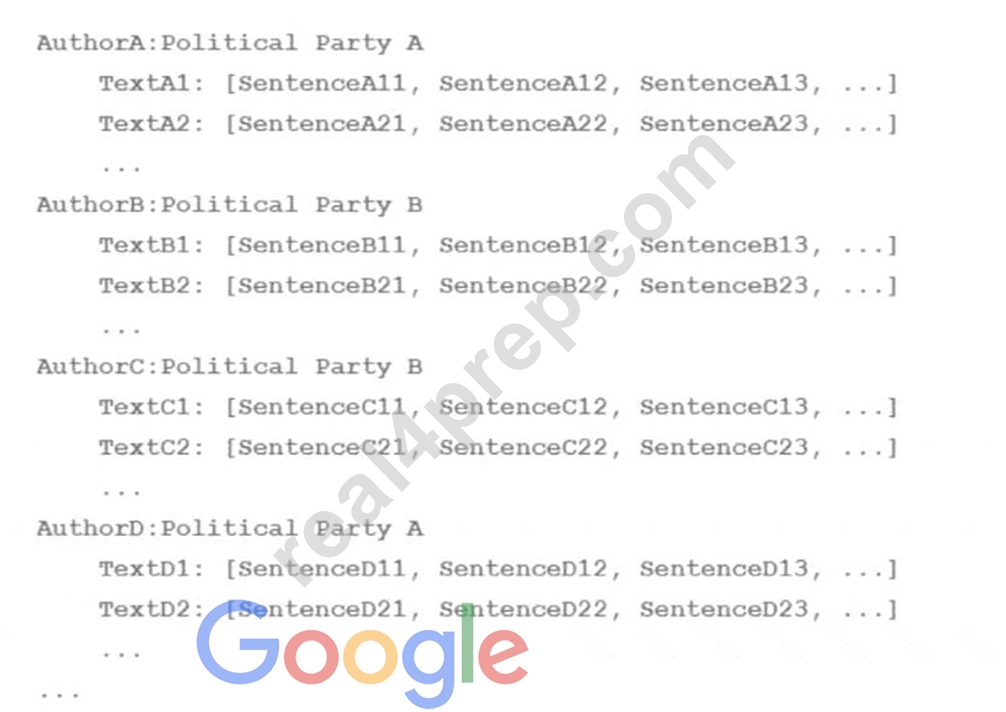
You followed the standard 80%-10%-10% data distribution across the training, testing, and evaluation subsets.
How should you distribute the training examples across the train-test-eval subsets while maintaining the
80-10-10 proportion?
- A.

- B.

- C.

- D.

Answer: C
Explanation:
The best way to distribute the training examples across the train-test-eval subsets while maintaining the
80-10-10 proportion is to use option C. This option ensures that each subset contains a balanced and representative sample of the different classes (Democrat and Republican) and the different authors. This way, the model can learn from a diverse and comprehensive set of articles and avoid overfitting or underfitting.
Option C also avoids the problem of data leakage, which occurs when thesame author appears in more than one subset, potentially biasing the model and inflating its performance. Therefore, option C is the most suitable technique for this use case.
NEW QUESTION # 23
Your company stores a large number of audio files of phone calls made to your customer call center in an on-premises database. Each audio file is in wav format and is approximately 5 minutes long. You need to analyze these audio files for customer sentiment. You plan to use the Speech-to-Text API. You want to use the most efficient approach. What should you do?
- A. 1 Upload the audio files to Cloud Storage
2 Call the speech: Iongrunningrecognize API endpoint to generate transcriptions.
3 Create a Cloud Function that calls the Natural Language API by using the analyzesentiment method - B. 1 Iterate over your local Tiles in Python
2. Use the Speech-to-Text Python library to create a speech.RecognitionAudio object and set the content to the audio file data
3. Call the speech: recognize API endpoint to generate transcriptions
4. Call the predict method of an AutoML sentiment analysis model to analyze the transcriptions - C. 1 Upload the audio files to Cloud Storage
2. Call the speech: Iongrunningrecognize API endpoint to generate transcriptions
3. Call the predict method of an AutoML sentiment analysis model to analyze the transcriptions - D. 1 Iterate over your local files in Python
2 Use the Speech-to-Text Python Library to create a speech.RecognitionAudio object, and set the content to the audio file data
3. Call the speech: lengrunningrecognize API endpoint to generate transcriptions
Answer: A
Explanation:
4 Call the Natural Language API by using the analyzesenriment method
NEW QUESTION # 24
Your team needs to build a model that predicts whether images contain a driver's license, passport, or credit card. The data engineering team already built the pipeline and generated a dataset composed of 10,000 images with driver's licenses, 1,000 images with passports, and 1,000 images with credit cards. You now have to train a model with the following label map: ['driversjicense', 'passport', 'credit_card']. Which loss function should you use?
- A. Categorical cross-entropy
- B. Categorical hinge
- C. Sparse categorical cross-entropy
- D. Binary cross-entropy
Answer: A
Explanation:
Categorical cross-entropy is a loss function that is suitable for multi-class classification problems, where the target variable has more than two possible values. Categorical cross-entropy measures the difference between the true probability distribution of the target classes and the predicted probability distribution of the model. It is defined as:
L - sum(y_i * log(p_i))
where y_i is the true probability of class i, and p_i is the predicted probability of class i. Categorical cross-entropy penalizes the model for making incorrect predictions, and encourages the model to assign high probabilities to the correct classes and low probabilities to the incorrect classes.
For the use case of building a model that predicts whether images contain a driver's license, passport, or credit card, categorical cross-entropy is the appropriate loss function to use. This is because the problem is a multi-class classification problem, where the target variable has three possible values: ['drivers_license', 'passport', 'credit_card']. The label map is a list that maps the class names to the class indices, such that 'drivers_license' corresponds to index 0, 'passport' corresponds to index 1, and 'credit_card' corresponds to index 2. The model should output a probability distribution over the three classes for each image, and the categorical cross-entropy loss function should compare the output with the true labels. Therefore, categorical cross-entropy is the best loss function for this use case.
NEW QUESTION # 25
You recently deployed a model lo a Vertex Al endpoint and set up online serving in Vertex Al Feature Store. You have configured a daily batch ingestion job to update your featurestore During the batch ingestion jobs you discover that CPU utilization is high in your featurestores online serving nodes and that feature retrieval latency is high. You need to improve online serving performance during the daily batch ingestion. What should you do?
- A. Enable autoscaling for the prediction nodes of your DeployedModel in the Vertex Al endpoint.
- B. Schedule an increase in the number of online serving nodes in your featurestore prior to the batch ingestion jobs.
- C. Enable autoscaling of the online serving nodes in your featurestore
- D. Increase the worker counts in the importFeaturevalues request of your batch ingestion job.
Answer: C
Explanation:
Vertex AI Feature Store provides two options for online serving: Bigtable and optimized online serving. Both options support autoscaling, which means that the number of online serving nodes can automatically adjust to the traffic demand. By enabling autoscaling, you can improve the online serving performance and reduce the feature retrieval latency during the daily batch ingestion. Autoscaling also helps you optimize the cost and resource utilization of your featurestore. Reference:
Online serving | Vertex AI | Google Cloud
New Vertex AI Feature Store: BigQuery-Powered, GenAI-Ready | Google Cloud Blog
NEW QUESTION # 26
You have recently used TensorFlow to train a classification model on tabular data You have created a Dataflow pipeline that can transform several terabytes of data into training or prediction datasets consisting of TFRecords. You now need to productionize the model, and you want the predictions to be automatically uploaded to a BigQuery table on a weekly schedule. What should you do?
- A. Import the model into Vertex Al and deploy it to a Vertex Al endpoint On Vertex Al Pipelines create a pipeline that uses the Dataf lowPythonJobop and the Mcdei3archPredictoc components.
- B. Import the model into Vertex Al and deploy it to a Vertex Al endpoint Create a Dataflow pipeline that reuses the data processing logic sends requests to the endpoint and then uploads predictions to a BigQuery table.
- C. Import the model into BigQuery Implement the data processing logic in a SQL query On Vertex Al Pipelines create a pipeline that uses the BigqueryQueryJobop and the EigqueryPredictModejobOp components.
- D. Import the model into Vertex Al On Vertex Al Pipelines, create a pipeline that uses the DatafIowPythonJobOp and the ModelBatchPredictOp components.
Answer: D
Explanation:
Vertex AI is a service that allows you to create and train ML models using Google Cloud technologies. You can use Vertex AI to import the model that you trained with TensorFlow and store it in the Vertex AI Model Registry. The Vertex AI Model Registry is a service that allows you to store and manage your ML models on Google Cloud. You can then use Vertex AI Pipelines to create a pipeline that uses the DataflowPythonJobOp and the ModelBatchPredictOp components. The DataflowPythonJobOp component is a component that allows you to run a Dataflow job using a Python script. Dataflow is a service that allows you to create and run scalable and portable data processing pipelines on Google Cloud. You can use the DataflowPythonJobOp component to reuse the data processing logic that you created for transforming the data into TFRecords. The ModelBatchPredictOp component is a component that allows you to run a batch prediction job using a model from the Vertex AI Model Registry. Batch prediction is a type of prediction that provides high-throughput responses to large batches of input data. You can use the ModelBatchPredictOp component to make predictions using the TFRecords from the DataflowPythonJobOp component and the model from the Vertex AI Model Registry. You can also configure the ModelBatchPredictOp component to automatically upload the predictions to a BigQuery table. BigQuery is a service that allows you to store and query large amounts of data in a scalable and cost-effective way. You can use BigQuery to store and analyze the predictions from your model. You can also schedule the pipeline to run on a weekly basis, so that the predictions are updated regularly. By using Vertex AI, Vertex AI Pipelines, Dataflow, and BigQuery, you can productionize the model and upload the predictions to a BigQuery table on a weekly schedule. Reference:
Vertex AI documentation
Vertex AI Pipelines documentation
Dataflow documentation
BigQuery documentation
Preparing for Google Cloud Certification: Machine Learning Engineer Professional Certificate
NEW QUESTION # 27
You are developing a recommendation engine for an online clothing store. The historical customer transaction data is stored in BigQuery and Cloud Storage. You need to perform exploratory data analysis (EDA), preprocessing and model training. You plan to rerun these EDA, preprocessing, and training steps as you experiment with different types of algorithms. You want to minimize the cost and development effort of running these steps as you experiment. How should you configure the environment?
- A. Create a Vertex Al Workbench managed notebook to browse and query the tables directly from the JupyterLab interface.
- B. Create a Vertex Al Workbench managed notebook on a Dataproc cluster, and use the spark-bigquery-connector to access the tables.
- C. Create a Vertex Al Workbench user-managed notebook using the default VM instance, and use the
%%bigquery magic commands in Jupyter to query the tables. - D. Create a Vertex Al Workbench user-managed notebook on a Dataproc Hub. and use the %%bigquery magic commands in Jupyter to query the tables.
Answer: C
Explanation:
* Cost-effectiveness: User-managed notebooks in Vertex AI Workbench allow you to leverage pre-configured virtual machines with reasonable resource allocation, keeping costs lower compared to options involving managed notebooks or Dataproc clusters.
* Development flexibility: User-managed notebooks offer full control over the environment, allowing you to install additional libraries or dependencies needed for your specific EDA, preprocessing, and model training tasks. This flexibility is crucial while experimenting with different algorithms.
* BigQuery integration: The %%bigquery magic commands provide seamless integration with BigQuery
* within the Jupyter Notebook environment. This enables efficient querying and exploration of customer transaction data stored in BigQuery directly from the notebook, streamlining the workflow.
Other options and why they are not the best fit:
* B. Managed notebook: While managed notebooks offer an easier setup, they might have limited customization options, potentially hindering your ability to install specific libraries or tools.
* C. Dataproc Hub: Dataproc Hub focuses on running large-scale distributed workloads, and it might be overkill for your scenario involving exploratory analysis and experimentation with different algorithms.
Additionally, it could incur higher costs compared to a user-managed notebook.
* D. Dataproc cluster with spark-bigquery-connector: Similar to option C, using a Dataproc cluster with the spark-bigquery-connector would be more complex and potentially more expensive than using
%%bigquery magic commands within a user-managed notebook for accessing BigQuery data.
References:
* https://cloud.google.com/vertex-ai/docs/workbench/instances/bigquery
* https://cloud.google.com/vertex-ai-notebooks
NEW QUESTION # 28
You work for a hotel and have a dataset that contains customers' written comments scanned from paper-based customer feedback forms which are stored as PDF files Every form has the same layout. You need to quickly predict an overall satisfaction score from the customer comments on each form. How should you accomplish this task'?
- A. Use the Vision API to parse the text from each PDF file Use the Natural Language API analyzesentiment feature to infer overall satisfaction scores.
- B. Uptrain a Document Al custom extractor to parse the text in the comments section of each PDF file. Use the Natural Language API analyzeEntitySentiment feature to infer overall satisfaction scores.
- C. Uptrain a Document Al custom extractor to parse the text in the comments section of each PDF file. Use the Natural Language API analyze sentiment feature to infer overall satisfaction scores.
- D. Use the Vision API to parse the text from each PDF file Use the Natural Language API analyzeEntitysentiment feature to infer overall satisfaction scores.
Answer: B
NEW QUESTION # 29
You are designing an architecture with a serveress ML system to enrich customer support tickets with informative metadata before they are routed to a support agent. You need a set of models to predict ticket priority, predict ticket resolution time, and perform sentiment analysis to help agents make strategic decisions when they process support requests. Tickets are not expected to have any domain-specific terms or jargon.
The proposed architecture has the following flow:
Which endpoints should the Enrichment Cloud Functions call?
- A. 1 = Al Platform, 2 = Al Platform, 3 = AutoML Vision
- B. 1 = cloud Natural Language API, 2 = Al Platform, 3 = Cloud Vision API
- C. 1 = Al Platform, 2 = Al Platform, 3 = AutoML Natural Language
- D. 1 = Al Platform, 2 = Al Platform, 3 = Cloud Natural Language API
Answer: C
NEW QUESTION # 30
You developed a Vertex Al ML pipeline that consists of preprocessing and training steps and each set of steps runs on a separate custom Docker image Your organization uses GitHub and GitHub Actions as CI/CD to run unit and integration tests You need to automate the model retraining workflow so that it can be initiated both manually and when a new version of the code is merged in the main branch You want to minimize the steps required to build the workflow while also allowing for maximum flexibility How should you configure the CI/CD workflow?
- A. Trigger a Cloud Build workflow to run tests build custom Docker images, push the images to Artifact Registry and launch the pipeline in Vertex Al Pipelines.
- B. Trigger GitHub Actions to run the tests launch a Cloud Build workflow to build custom Dicker images, push the images to Artifact Registry, and launch the pipeline in Vertex Al Pipelines.
- C. Trigger GitHub Actions to run the tests launch a job on Cloud Run to build custom Docker images push the images to Artifact Registry and launch the pipeline in Vertex Al Pipelines.
- D. Trigger GitHub Actions to run the tests build custom Docker images push the images to Artifact Registry, and launch the pipeline in Vertex Al Pipelines.
Answer: B
Explanation:
The best option for automating the model retraining workflow is to use GitHub Actions and Cloud Build.
GitHub Actions is a service that can create and run workflows for continuous integration and continuous delivery (CI/CD) on GitHub. GitHub Actions can run tests, build and deploy code, andtrigger other actions based on events such as code changes, pull requests, or manual triggers. Cloud Build is a service that can create and run scalable and reliable pipelines to build, test, and deploy software on Google Cloud. Cloud Build can build custom Docker images, push the images to Artifact Registry, and launch the pipeline in Vertex AI Pipelines. Vertex AI Pipelines is a service that can orchestrate machine learning (ML) workflows using Vertex AI. Vertex AI Pipelines can run preprocessing and training steps on custom Docker images, and evaluate, deploy, and monitor the ML model. By using GitHub Actions and Cloud Build, users can leverage the power and flexibility of Google Cloud to automate the model retraining workflow, while minimizing the steps required to build the workflow.
The other options are not as good as option D, for the following reasons:
* Option A: Triggering a Cloud Build workflow to run tests, build custom Docker images, push the images to Artifact Registry, and launch the pipeline in Vertex AI Pipelines would require more configuration and maintenance than using GitHub Actions and Cloud Build. Cloud Build is a service that can create and run pipelines to build, test, and deploy software on Google Cloud, but it is not designed to integrate with GitHub or other source code repositories. To trigger a Cloud Build workflow from GitHub, users would need to set up a webhook, a Cloud Pub/Sub topic, and a Cloud Function1. Moreover, Cloud Build does not support manual triggers, which limits the flexibility of the workflow2.
* Option B: Triggering GitHub Actions to run the tests, launching a job on Cloud Run to build custom Docker images, pushing the images to Artifact Registry, and launching the pipeline in Vertex AI Pipelines would require more steps and resources than using GitHub Actions and Cloud Build. Cloud Run is a service that can run stateless containers on a fully managed environment or on Anthos. Cloud Run can build custom Docker images, but it is not optimized for this task. Users would need to write a Dockerfile, a cloudbuild.yaml file, and a Cloud Run service configuration file, and use the gcloud
* command-line tool to build and deploy the image3. Moreover, Cloud Run is designed for serving HTTP requests, not for running ML pipelines, which can have different performance and scalability requirements.
* Option C: Triggering GitHub Actions to run the tests, building custom Docker images, pushing the images to Artifact Registry, and launching the pipeline in Vertex AI Pipelines would require more skills and tools than using GitHub Actions and Cloud Build. GitHub Actions can run tests and build code, but it is not specialized for building Docker images. Users would need to install and configure Docker on the GitHub Actions runner, write a Dockerfile, and use the docker command-line tool to build and push the image. Moreover, GitHub Actions has limitations on the disk space, memory, and CPU of the runner, which can affect the speed and reliability of the image building process.
References:
* Building CI/CD for Vertex AI pipelines: The first solution
* Cloud Build
* GitHub Actions
* Vertex AI Pipelines
* Triggering builds from GitHub
* Triggering builds manually
* Building containers
* Cloud Run
* [Building and testing Docker images with GitHub Actions]
* [Usage limits, billing, and administration]
NEW QUESTION # 31
You are the Director of Data Science at a large company, and your Data Science team has recently begun using the Kubeflow Pipelines SDK to orchestrate their training pipelines. Your team is struggling to integrate their custom Python code into the Kubeflow Pipelines SDK. How should you instruct them to proceed in order to quickly integrate their code with the Kubeflow Pipelines SDK?
- A. Use the predefined components available in the Kubeflow Pipelines SDK to access Dataproc, and run the custom code there.
- B. Package the custom Python code into Docker containers, and use the load_component_from_file function to import the containers into the pipeline.
- C. Deploy the custom Python code to Cloud Functions, and use Kubeflow Pipelines to trigger the Cloud Function.
- D. Use the func_to_container_op function to create custom components from the Python code.
Answer: D
Explanation:
The easiest way to integrate custom Python code into the Kubeflow Pipelines SDK is to use the func_to_container_op function, which converts a Python function into a pipeline component. This function automatically builds a Docker image that executes the Python function, and returns a factory function that can be used to create kfp.dsl.ContainerOp instances for the pipeline. This option has the following benefits:
It allows the data science team to reuse their existing Python code without rewriting it or packaging it into containers manually.
It simplifies the component specification and implementation, as the function signature defines the component interface and the function body defines the component logic.
It supports various types of inputs and outputs, such as primitive types, files, directories, and dictionaries.
The other options are less optimal for the following reasons:
Option B: Using the predefined components available in the Kubeflow Pipelines SDK to access Dataproc, and run the custom code there, introduces additional complexity and cost. This option requires creating and managing Dataproc clusters, which are ephemeral and scalable clusters of Compute Engine instances that run Apache Spark and Apache Hadoop. Moreover, this option requires writing the custom code in PySpark or Hadoop MapReduce, which may not be compatible with the existing Python code.
Option C: Packaging the custom Python code into Docker containers, and using the load_component_from_file function to import the containers into the pipeline, introduces additional steps and overhead. This option requires creating and maintaining Dockerfiles, building and pushing Docker images, and writing component specifications in YAML files. Moreover, this option requires managing the dependencies and versions of the Python code and the Docker images.
Option D: Deploying the custom Python code to Cloud Functions, and using Kubeflow Pipelines to trigger the Cloud Function, introduces additional latency and limitations. This option requires creating and deploying Cloud Functions, which are serverless functions that execute in response to events. Moreover, this option requires invoking the Cloud Functions from the Kubeflow Pipelines using HTTP requests, which can incur network overhead and latency. Additionally, this option is subject to the quotas and limits of Cloud Functions, such as the maximum execution time and memory usage.
Reference:
Building Python function-based components | Kubeflow
Building Python Function-based Components | Kubeflow
NEW QUESTION # 32
You have been asked to build a model using a dataset that is stored in a medium-sized (~10 GB) BigQuery table. You need to quickly determine whether this data is suitable for model development. You want to create a one-time report that includes both informative visualizations of data distributions and more sophisticated statistical analyses to share with other ML engineers on your team. You require maximum flexibility to create your report. What should you do?
- A. Use Vertex AI Workbench user-managed notebooks to generate the report.
- B. Use the output from TensorFlow Data Validation on Dataflow to generate the report.
- C. Use the Google Data Studio to create the report.
- D. Use Dataprep to create the report.
Answer: A
Explanation:
* Option A is correct because using Vertex AI Workbench user-managed notebooks to generate the report is the best way to quickly determine whether the data is suitable for model development, and to create a one-time report that includes both informative visualizations of data distributions and more sophisticated statistical analyses to share with other ML engineers on your team. Vertex AI Workbench is a service that allows you to create and use notebooks for ML development and experimentation. You can use Vertex AI Workbench to connect to your BigQuery table, query and analyze the data using SQL or Python, and create interactive charts and plots using libraries such as pandas, matplotlib, or seaborn.
You can also use Vertex AI Workbench to perform more advanced data analysis, such as outlier detection, feature engineering, or hypothesis testing, using libraries such as TensorFlow Data Validation, TensorFlow Transform, or SciPy. You can export your notebook as a PDF or HTML file, and share it with your team. Vertex AI Workbench provides maximum flexibility to create your report, as you can use any code or library that you want, and customize the report as you wish.
* Option B is incorrect because using Google Data Studio to create the report is not the most flexible way to quickly determine whether the data is suitable for model development, and to create a one-time report that includes both informative visualizations of data distributions and more sophisticated statistical analyses to share with other ML engineers on your team. Google Data Studio is a service that allows you to create and share interactive dashboards and reports using data from various sources, such as BigQuery, Google Sheets, or Google Analytics. You can use Google Data Studio to connect to your BigQuery table, explore and visualize the data using charts, tables, or maps, and apply filters, calculations, or aggregations to the data. However, Google Data Studio does not support more sophisticated statistical analyses, such as outlier detection, feature engineering, or hypothesis testing, which may be useful for model development. Moreover, Google Data Studio is more suitable for creating recurring reports that need to be updated frequently, rather than one-time reports that are static.
* Option C is incorrect because using the output from TensorFlow Data Validation on Dataflow to generate the report is not the most efficient way to quickly determine whether the data is suitable for model development, and to create a one-time report that includes both informative visualizations of data distributions and more sophisticated statistical analyses to share with other ML engineers on your team.
TensorFlow Data Validation is a library that allows you to explore, validate, and monitor the quality of your data for ML. You can use TensorFlow Data Validation to compute descriptive statistics, detect anomalies, infer schemas, and generate data visualizations for your data. Dataflow is a service that allows you to create and run scalable data processing pipelines using Apache Beam. You can use Dataflow to run TensorFlow Data Validation on large datasets, such as those stored in BigQuery.
However, this option is not very efficient, as it involves moving the data from BigQuery to Dataflow,
* creating and running the pipeline, and exporting the results. Moreover, this option does not provide maximum flexibility to create your report, as you are limited by the functionalities of TensorFlow Data Validation, and you may not be able to customize the report as you wish.
* Option D is incorrect because using Dataprep to create the report is not the most flexible way to quickly determine whether the data is suitable for model development, and to create a one-time report that includes both informative visualizations of data distributions and more sophisticated statistical analyses to share with other ML engineers on your team. Dataprep is a service that allows you to explore, clean, and transform your data for analysis or ML. You can use Dataprep to connect to your BigQuery table, inspect and profile the data using histograms, charts, or summary statistics, and apply transformations, such as filtering, joining, splitting, or aggregating, to the data. However, Dataprep does not support more sophisticated statistical analyses, such as outlier detection, feature engineering, or hypothesis testing, which may be useful for model development. Moreover, Dataprep is more suitable for creating data preparation workflows that need to be executed repeatedly, rather than one-time reports that are static.
References:
* Vertex AI Workbench documentation
* Google Data Studio documentation
* TensorFlow Data Validation documentation
* Dataflow documentation
* Dataprep documentation
* [BigQuery documentation]
* [pandas documentation]
* [matplotlib documentation]
* [seaborn documentation]
* [TensorFlow Transform documentation]
* [SciPy documentation]
* [Apache Beam documentation]
NEW QUESTION # 33
Your team is building an application for a global bank that will be used by millions of customers. You built a forecasting model that predicts customers1 account balances 3 days in the future. Your team will use the results in a new feature that will notify users when their account balance is likely to drop below $25. How should you serve your predictions?
- A. 1. Build a notification system on Firebase
2. Register each user with a user ID on the Firebase Cloud Messaging server, which sends a notification when the average of all account balance predictions drops below the $25 threshold - B. 1. Create a Pub/Sub topic for each user
2. Deploy an application on the App Engine standard environment that sends a notification when your model predicts that a user's account balance will drop below the $25 threshold - C. 1. Create a Pub/Sub topic for each user
2 Deploy a Cloud Function that sends a notification when your model predicts that a user's account balance will drop below the $25 threshold. - D. 1 Build a notification system on Firebase
2. Register each user with a user ID on the Firebase Cloud Messaging server, which sends a notification when your model predicts that a user's account balance will drop below the $25 threshold
Answer: D
Explanation:
This answer is correct because it uses Firebase, a platform that provides a scalable and reliable notification system for mobile and web applications. Firebase Cloud Messaging (FCM) allows you to send messages and notifications to users across different devices and platforms. By registering each user with a user ID on the FCM server, you can target specific users based on their account balance predictions and send them personalized notifications when their balance is likely to drop below the $25 threshold. This way, you can provide a useful and timely feature for your customers and increase their engagement and retention. Reference:
[Firebase Cloud Messaging]
[Firebase Cloud Messaging: Send messages to specific devices]
NEW QUESTION # 34
You recently joined an enterprise-scale company that has thousands of datasets. You know that there are accurate descriptions for each table in BigQuery, and you are searching for the proper BigQuery table to use for a model you are building on AI Platform. How should you find the data that you need?
- A. Use Data Catalog to search the BigQuery datasets by using keywords in the table description.
- B. Maintain a lookup table in BigQuery that maps the table descriptions to the table ID. Query the lookup table to find the correct table ID for the data that you need.
- C. Tag each of your model and version resources on AI Platform with the name of the BigQuery table that was used for training.
- D. Execute a query in BigQuery to retrieve all the existing table names in your project using the
Answer: A
Explanation:
INFORMATION_SCHEMA metadata tables that are native to BigQuery. Use the result o find the table that you need.
Explanation:
A should be the way to go for large datasets --This is also good but it is legacy way of checking:- NFORMATION_SCHEMA contains these views for table metadata: TABLES and TABLE_OPTIONS for metadata about tables. COLUMNS and COLUMN_FIELD_PATHS for metadata about columns and fields. PARTITIONS for metadata about table partitions (Preview)
NEW QUESTION # 35
You work for a bank You have been asked to develop an ML model that will support loan application decisions. You need to determine which Vertex Al services to include in the workflow You want to track the model's training parameters and the metrics per training epoch. You plan to compare the performance of each version of the model to determine the best model based on your chosen metrics. Which Vertex Al services should you use?
- A. Vertex ML Metadata Vertex Al Feature Store, and Vertex Al Vizier
- B. Vertex Al Pipelines. Vertex Al Feature Store, and Vertex Al TensorBoard
- C. Vertex Al Pipelines. Vertex Al Experiments, and Vertex Al Vizier
- D. Vertex ML Metadata Vertex Al Experiments, and Vertex Al TensorBoard
Answer: D
Explanation:
According to the official exam guide1, one of the skills assessed in the exam is to "track the lineage of pipeline artifacts". Vertex ML Metadata2 is a service that allows you to store, query, and visualize metadata associated with your ML workflows, such as datasets, models, metrics, and executions. Vertex ML Metadata helps you track the provenance and lineage of your ML artifacts and understand the relationships between them. Vertex AI Experiments3 is a service that allows you to track and compare the results of your model training runs. Vertex AI Experiments automatically logs metadata such as hyperparameters, metrics, and artifacts for each training run. You can use Vertex AI Experiments to train your custom model using TensorFlow, PyTorch, XGBoost, or scikit-learn. Vertex AI TensorBoard4 is a service that allows you to visualize and monitor your ML experiments using TensorBoard, an open source tool for ML visualization. Vertex AI TensorBoard helps you track the model's training parameters and the metrics per training epoch, and compare the performance of each version of the model. Therefore, option C is the best way to determine which Vertex AI services to include in the workflow for the given use case. The other options are not relevant or optimal for this scenario. Reference:
Professional ML Engineer Exam Guide
Vertex ML Metadata
Vertex AI Experiments
Vertex AI TensorBoard
Google Professional Machine Learning Certification Exam 2023
Latest Google Professional Machine Learning Engineer Actual Free Exam Questions
NEW QUESTION # 36
You are building an ML model to detect anomalies in real-time sensor dat a. You will use Pub/Sub to handle incoming requests. You want to store the results for analytics and visualization. How should you configure the pipeline?
- A. 1 = Dataflow, 2 - Al Platform, 3 = BigQuery
- B. 1 = BigQuery, 2 = AutoML, 3 = Cloud Functions
- C. 1 = BigQuery, 2 = Al Platform, 3 = Cloud Storage
- D. 1 = DataProc, 2 = AutoML, 3 = Cloud Bigtable
Answer: A
NEW QUESTION # 37
Your data science team is training a PyTorch model for image classification based on a pre-trained RestNet model. You need to perform hyperparameter tuning to optimize for several parameters. What should you do?
- A. Convert the model to a Keras model, and run a Keras Tuner job.
- B. Create a Kuberflow Pipelines instance, and run a hyperparameter tuning job on Katib.
- C. Convert the model to a TensorFlow model, and run a hyperparameter tuning job on AI Platform.
- D. Run a hyperparameter tuning job on AI Platform using custom containers.
Answer: D
Explanation:
AI Platform supports hyperparameter tuning for PyTorch models using custom containers. This allows you to use any Python dependencies and libraries that are not included in the pre-built AI Platform Training runtime versions. You can also use a pre-trained model such as ResNet as a base for your custom model. To run a hyperparameter tuning job on AI Platform using custom containers, you need to do the following steps:
* Create a Dockerfile that defines the container image for your training application. The Dockerfile should install PyTorch and any other dependencies, copy your training code and configuration files, and set the entrypoint for the container.
* Build the container image and push it to Container Registry or another accessible registry.
* Create a YAML file that defines the configuration for your hyperparameter tuning job. The YAML file should specify the container image URI, the training input and output paths, the hyperparameters to tune, the metric to optimize, and the tuning algorithm and budget.
* Submit the hyperparameter tuning job to AI Platform using the gcloud command-line tool or the AI Platform Training API.
References:
* Hyperparameter tuning overview
* Using custom containers
* PyTorch on AI Platform Training
NEW QUESTION # 38
You work for a large social network service provider whose users post articles and discuss news. Millions of comments are posted online each day, and more than 200 human moderators constantly review comments and flag those that are inappropriate. Your team is building an ML model to help human moderators check content on the platform. The model scores each comment and flags suspicious comments to be reviewed by a human. Which metric(s) should you use to monitor the model's performance?
- A. Number of messages flagged by the model per minute
- B. Precision and recall estimates based on a sample of messages flagged by the model as potentially inappropriate each minute
- C. Precision and recall estimates based on a random sample of 0.1% of raw messages each minute sent to a human for review
- D. Number of messages flagged by the model per minute confirmed as being inappropriate by humans.
Answer: D
NEW QUESTION # 39
......
Download Free Latest Exam Professional-Machine-Learning-Engineer Certified Sample Questions: https://www.real4prep.com/Professional-Machine-Learning-Engineer-exam.html
Professional-Machine-Learning-Engineer Actual Questions - Instant Download 290 Questions: https://drive.google.com/open?id=1FtWw6IQchKf6NgqU_p41xijeVJByHIKb