


Get Prepared for Your MS-101 Exam With Actual Microsoft Study Guide!
Pass Your Next MS-101 Certification Exam Easily & Hassle Free
NEW QUESTION # 176
You have a Microsoft 365 subscription.
You have a user named User1.
You need to ensure that User1 can place a litigation hold on all mailbox content.
Which role should you assign to User1?
- A. User management administrator from the Microsoft 365 admin center
- B. Information Protection administrator from the Azure Active Directory admin center
- C. Compliance Management from the Exchange admin center
- D. eDiscovery Manager from the Security & Compliance admin center
Answer: D
Explanation:
Section: [none]
Explanation/Reference:
References:
https://docs.microsoft.com/en-us/Exchange/permissions/feature-permissions/policy-and-compliance- permissions?view=exchserver-2019
NEW QUESTION # 177
You have 100 computers that run Windows 8.1 and are enrolled in Upgrade Readiness.
Two of the computers are configured as shown in the following table.
From Upgrade Readiness, you view the applications shown in the following table.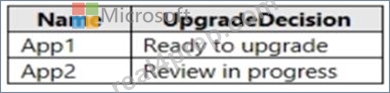
You enroll a computer named Computer3 in Upgrade Readiness. Computer3 has the following configurations:
* 8 GB of memory
* 64-bit architecture
* An application named App3 installed
App3 is installed on Computer3 only.
For each of the following statements, select Yes if the statement is true. Otherwise, select No.
NOTE: Each correct selection is worth one point.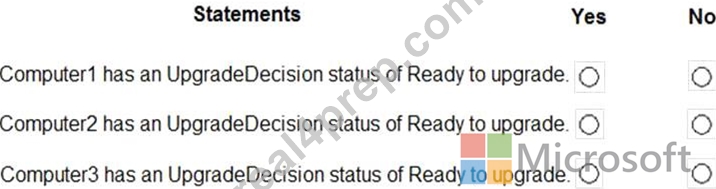
Answer:
Explanation:
Explanation
NEW QUESTION # 178
You have a Microsoft 365 subscription.
You recently configured a Microsoft SharePoint Online tenant in the subscription.
You plan to create an alert policy.
You need to ensure that an alert is generated only when malware is detected in more than five documents stored in SharePoint Online during a period of 10 minutes.
What should you do first?
- A. Enable Microsoft Office 365 Analytics.
- B. Deploy Microsoft Defender Advanced Threat Protection (Microsoft Defender ATP)
- C. Enable Microsoft Office 365 Cloud App Security.
Answer: B
NEW QUESTION # 179
You have a Microsoft 365 E5 subscription.
You need to be notified if users receive email containing a file that has a virus.
What should you do?
- A. From the Exchange admin center, create a spam filter policy.
- B. From the Exchange admin center, create an in-place eDiscovery & hold.
- C. From the Exchange admin center, create an anti-malware policy.
- D. From the Exchange admin center, create a mail flow rule.
Answer: C
Explanation:
Explanation/Reference:
https://docs.microsoft.com/en-us/office365/servicedescriptions/exchange-online-service-description/anti-spam- and-anti-malware-protection
NEW QUESTION # 180
Note: This question is part of a series of questions that present the same scenario. Each question in the series contains a unique solution that might meet the stated goals- Some question sets might have more than one correct solution, while others might not have a correct solution.
After you answer a question in this section, you will NOT be able to return to it. As a result, these questions will not appear in the review screen.
Your network contains an Active Directory domain named contoso.com that is synced to Microsoft Azure Active Directory (Azure AD).
You manage Windows 10 devices by using Microsoft System Center Configuration Manager (Current Branch).
You configure pilot co-management
You add a new device named Device 1 to the domain. You install the Configuration Manager client on Device1.
You need to ensure that you can manage Device1 by using Microsoft Intune and Configuration Manager.
Solution: You unjoin Device1 from the Active Directory domain.
Does this meet the goal?
- A. Yes
- B. No
Answer: A
NEW QUESTION # 181
Your company has a Microsoft 365 tenant
You plan to allow users that are members of a group named Engineering to enroll their mobile device in mobile device management (MDM) The device type restriction are configured as shown in the following table.
The device limit restriction are configured as shown in the following table.

Answer:
Explanation:
NEW QUESTION # 182
You have a Microsoft 365 E5 tenant that contains the users shown in the following table.
The tenant contains the devices shown in the following table.
You have the apps shown in the following table.
You plan to use Microsoft Endpoint Manager to manage the apps for the users.
For each of the following statements, select Yes if the statement is true. Otherwise, select No.
NOTE: Each correct selection is worth one point.
Answer:
Explanation:
Reference:
https://docs.microsoft.com/en-us/mem/intune/apps/apps-deploy
https://docs.microsoft.com/en-us/mem/intune/apps/apps-windows-10-app-deploy
NEW QUESTION # 183
Note: This question is part of a series of questions that present the same scenario. Each question in the series contains a unique solution that might meet the stated goals. Some question sets might have more than one correct solution, while others might not have a correct solution.
After you answer a question in this section, you will NOT be able to return to it. As a result, these questions will not appear in the review screen.
You have a Microsoft 365 subscription.
You need to prevent users from accessing your Microsoft SharePoint Online sites unless the users are connected to your on-premises network.
Solution: From the Azure Active Directory admin center, you create a trusted location and a conditional access policy.
Does this meet the goal?
- A. Yes
- B. No
Answer: B
Explanation:
This solution applies to users accessing Azure Active Directory, not to users accessing SharePoint Online.
Conditional Access in SharePoint Online can be configured to use an IP Address white list to allow access.
Reference:
https://docs.microsoft.com/en-us/azure/active-directory/conditional-access/location-condition
https://techcommunity.microsoft.com/t5/Microsoft-SharePoint-Blog/Conditional-Access-in-SharePoint-Onlineand-OneDrive-for/ba-p/46678
NEW QUESTION # 184
HOTSPOT
From the Security & Compliance admin center, you create a retention policy named Policy1.
You need to prevent all users from disabling the policy or reducing the retention period.
Which command should you run? To answer, select the appropriate options in the answer area.
NOTE: Each correct selection is worth one point.
Hot Area:
Answer:
Explanation:
Section: [none]
Explanation/Reference:
References:
https://docs.microsoft.com/en-us/powershell/module/exchange/policy-and-compliance-retention/set- retentioncompliancepolicy?view=exchange-ps
NEW QUESTION # 185
Your company uses Microsoft Defender Advanced Threat Protection (Microsoft Defender ATP).
The devices onboarded to Microsoft Defender ATP are shown in the following table.
The alerts visible in the Microsoft Defender ATP alerts queue are shown in the following table.
You create a suppression rule that has the following settings:
Triggering IOC: Any IOC
Action: Hide alert
Suppression scope: Alerts on ATP1 machine group
For each of the following statements, select Yes if the statement is true. Otherwise, select No.
NOTE: Each correct selection is worth one point.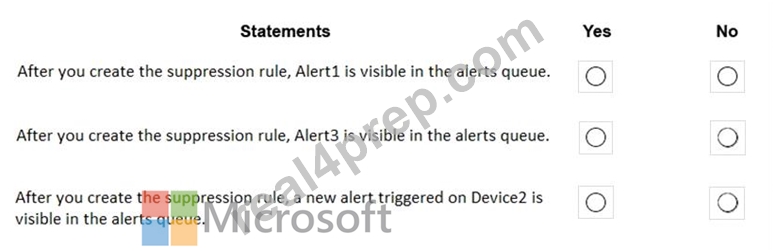
Answer:
Explanation: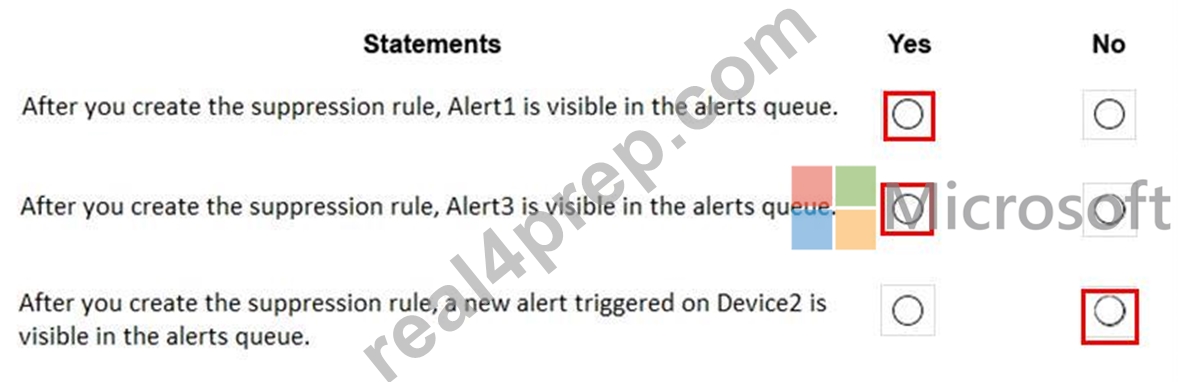
NEW QUESTION # 186
You have 100 computers that run Windows 8.1 and are enrolled in Upgrade Readiness.
Two of the computers are configured as shown in the following table.
From Upgrade Readiness, you view the applications shown in the following table.
You enroll a computer named Computer3 in Upgrade Readiness. Computer3 has the following configurations:
8 GB of memory
64-bit architecture
An application named App3 installed
App3 is installed on Computer3 only.
For each of the following statements, select Yes if the statement is true. Otherwise, select No.
NOTE: Each correct selection is worth one point.
Answer:
Explanation:
NEW QUESTION # 187
You use Microsoft Defender for Endpoint.
You have the Microsoft Defender for Endpoint device groups shown in the following table
You plan to onboard computers to Microsoft Defender for Endpoint as shown in the following table.
Answer:
Explanation: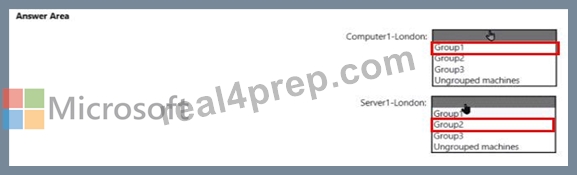
NEW QUESTION # 188
Your company has a Microsoft 365 subscription.
You need to configure Microsoft 365 to meet the following requirements:
* Malware found in email attachments must be quarantined for 20 days.
* The email address of senders to your company must be verified.
Which two options should you configure in the Security & Compliance admin center? To answer, select the appropriate options in the answer area.
NOTE: Each correct selection is worth one point.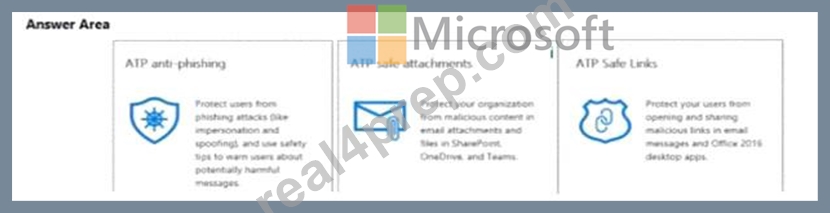
Answer:
Explanation:
Explanation
NEW QUESTION # 189
You plan to allow users from the engineering department to enroll their mobile device in mobile device management (MDM).
The device type restrictions are configured as shown in the following table.
The device limit restrictions are configured as shown in the following table.
What is the effective configuration for the members of the Engineering group? To answer, select the appropriate options in the answer area.
NOTE: Each correct selection is worth one point.
Answer:
Explanation:
Explanation
NEW QUESTION # 190
You have a Microsoft 365 tenant named contoso.com. The tenant contains the users shown in the following table.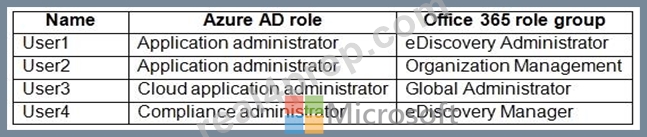
You have the eDiscovery cases shown in the following table.
For each of the following statements, select Yes if the statement is true. Otherwise, select No.
NOTE: Each correct selection is worth one point.
Answer:
Explanation:
Explanation:
References:
https://docs.microsoft.com/en-us/microsoft-365/compliance/assign-ediscovery-permissions
NEW QUESTION # 191
Note: This question is part of a series of questions that present the same scenario. Each question in the series contains a unique solution that might meet the stated goals. Some question sets might have more than one correct solution, while others might not have a correct solution.
After you answer a question in this section, you will NOT be able to return to it As a result these questions will not appear In the review screen.
You have a Microsoft Azure Active directory (Azure AD) tenant named contoso.com.
You create an Azure Advanced Threat Protection (ATP) workspace named Workspace1.
The tenet contains the users shown in the following table .
You need to modify the configuration of the Azure ATP sensors.
Solution: You instruct User 3 to modify the Azure ATP sensor configuration-
Does this meet the goal?
- A. Yes
- B. No
Answer: B
Explanation:
Only Azure ATP administrators can modify the sensors.
Any global administrator or security administrator on the tenant's Azure Active Directory is automatically an Azure ATP administrator.
Reference:
https://docs.microsoft.com/en-us/azure-advanced-threat-protection/atp-role-groups
NEW QUESTION # 192
......
Ace MS-101 Certification with 408 Actual Questions: https://www.real4prep.com/MS-101-exam.html
Free Microsoft MS-101 Exam Question Practice Exams: https://drive.google.com/open?id=134ZGewbkEvrcVFuxrcuN2eN_rcIGrSIu